OpenVINO2025 无依赖部署PaddleOCRv4模型
PaddleOCRv5版把模型格式改成了JSON格式了,需要线转换为ONNX格式之后才可以方便对接到OpenVINO部署,而PaddleOCRv4版本依然保留了之前的文件格式,可以被OpenVINO2025直接读取与加载,相对来说更加方便好用。
因为PaddleOCRv5版把模型格式改成了JSON格式了,需要线转换为ONNX格式之后才可以方便对接到OpenVINO部署,而PaddleOCRv4版本依然保留了之前的文件格式,可以被OpenVINO2025直接读取与加载,相对来说更加方便好用。
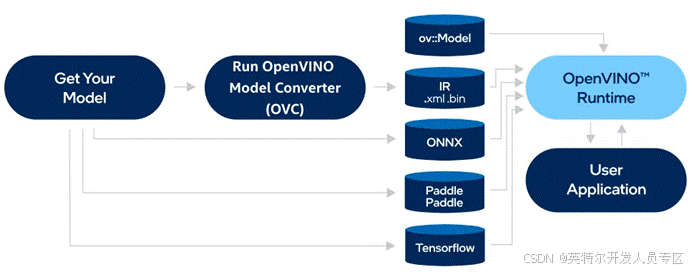
但是OpenVINO给出的官方演示代码都依赖Paddle跟Paddlex包,这个对于应用集成来说就很不友好,我们需要的是基于OpenVINO框架直接部署而无其他依赖的模型推理与部署方式。所以这篇文章就是我怎么把这些依赖去掉,然后实现基于OpenCV + OpenVINO来部署PaddleOCR模型的探索。
第一步:下载模型
下载文本检测模型
下载文本识别模型
第二步:推理流程分析
OpenVINO加载模型与推理流程如下:
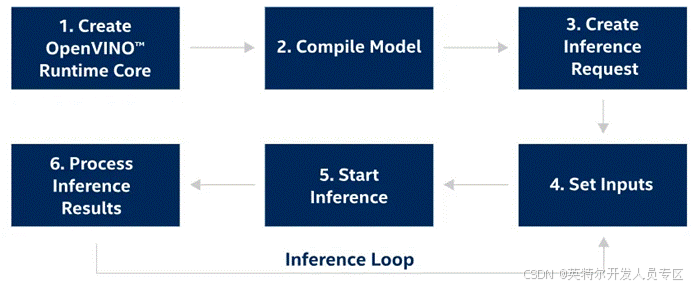
因为我们有两个模型需要分别加载,加载模型只需要调用OpenVINO的SDK即可实现,需要依赖paddle与paddlex的代码主要集中在对模型输入图像的预处理与后处理上面,我认真查看了这部分代码,发现其中有一部分是基于paddle跟paddlex完成的,于是我都给改成OpenCV的了,然后把一些基于paddle数据处理分支全部干掉,原因是我们的推理是基于numpy数据的而不是tensor数据。通过我的一通操作以后,把预处理跟后处理重新整理成一个Python文件,再也不依赖Paddle相关的任何包了。我把这个文件取名叫:
paddle_dettext_prepost_process.py (毕竟我是在基础上整理出来的)
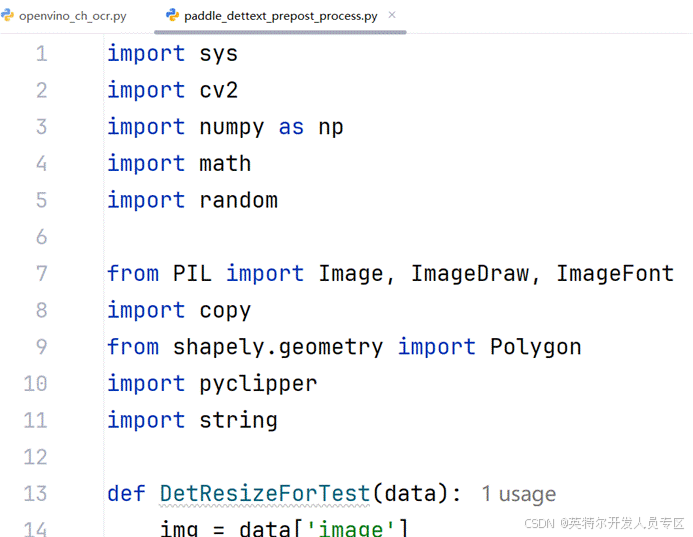
可以看出头文件依赖再也找不到paddle相关的东西了。
最终实现OpenVINO2025部署演示代码里面的头文件依赖
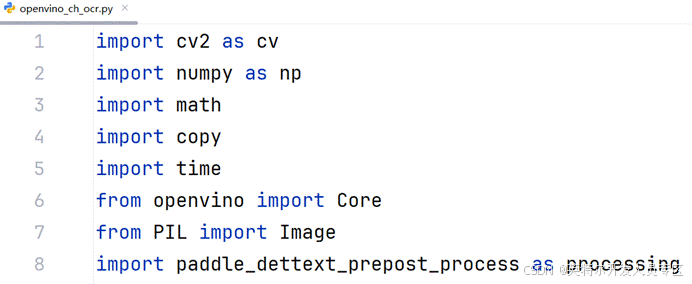
最终实现OpenVINO调用paddleOCR模型完成OCR识别的代码如下:
def run_paddle_ocr():

    core = Core()

    det_model = core.read_model(model="./models/ch_PP-OCRv4_det_infer.pdmodel")

    det_compiled_model = core.compile_model(model=det_model, device_name="CPU")


    # Get input and output nodes for text detection.

    det_input_layer = det_compiled_model.input(0)

    det_output_layer = det_compiled_model.output(0)


    rec_compiled_model = core.compile_model(model="./models/ch_PP-OCRv4_rec_infer.pdmodel", device_name="AUTO")


    # Get input and output nodes.

    rec_input_layer = rec_compiled_model.input(0)

    rec_output_layer = rec_compiled_model.output(0)

    start = time.time()

    frame = cv.imread("1725.jpg")

    cv.imshow("input", frame)

    scale = 1280 / max(frame.shape)

    if scale < 1:

        frame = cv.resize(

            src=frame,

            dsize=None,

            fx=scale,

            fy=scale,

            interpolation=cv.INTER_AREA,

        )

    # Preprocess the image for text detection.

    test_image = image_preprocess(frame, 640)


    # Measure processing time for text detection.

    det_results = det_compiled_model([test_image])[det_output_layer]


    # Postprocessing for Paddle Detection.

    dt_boxes = post_processing_detection(frame, det_results)


    # Preprocess detection results for recognition.

    dt_boxes = processing.sorted_boxes(dt_boxes)

    batch_num = 6

    img_crop_list, img_num, indices = prep_for_rec(dt_boxes, frame)


    # For storing recognition results, include two parts:

    # txts are the recognized text results, scores are the recognition confidence level.

    rec_res = [["", 0.0]] * img_num

    txts = []

    scores = []


    for beg_img_no in range(0, img_num, batch_num):

        # Recognition starts from here.

        norm_img_batch = batch_text_box(img_crop_list, img_num, indices, beg_img_no, batch_num)


        # Run inference for text recognition.

        rec_results = rec_compiled_model([norm_img_batch])[rec_output_layer]


        # Postprocessing recognition results.

        postprocess_op = processing.build_post_process(processing.postprocess_params)

        rec_result = postprocess_op(rec_results)

        for rno in range(len(rec_result)):

            rec_res[indices[beg_img_no + rno]] = rec_result[rno]

        if rec_res:

            txts = [rec_res[i][0] for i in range(len(rec_res))]

            scores = [rec_res[i][1] for i in range(len(rec_res))]


    image = Image.fromarray(cv.cvtColor(frame, cv.COLOR_BGR2RGB))

    boxes = dt_boxes

    # Draw text recognition results beside the image.

    draw_img = processing.draw_ocr_box_txt(image, boxes, txts, scores, drop_score=0.5)


    # Visualize the PaddleOCR results.

    end = time.time()

    inf_end = end - start

    fps = 1 / inf_end

    fps_label = "FPS: %.2f" % fps

    f_height, f_width = draw_img.shape[:2]

    cv.putText(

        img=draw_img,

        text=fps_label,

        org=(20, 40),

        fontFace=cv.FONT_HERSHEY_COMPLEX,

        fontScale=f_width / 1000,

        color=(0, 0, 255),

        thickness=1,

        lineType=cv.LINE_AA,

    )

    draw_img = cv.cvtColor(draw_img, cv.COLOR_RGB2BGR)

    cv.imshow("OpenVINO2025 PaddleOCR", draw_img)

    cv.waitKey(0)

    cv.destroyAllWindows()
运行效果截图如下:
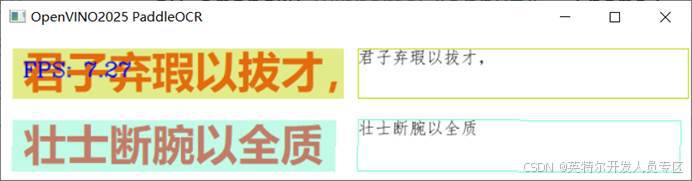
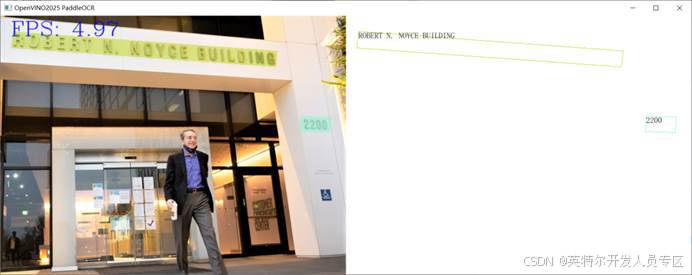
从此我又相信OpenVINO2025了,用它OCR识别真的很靠谱!

为开发者提供丰富的英特尔开发套件资源、创新技术、解决方案与行业活动。欢迎关注!
更多推荐



 5
5 0
0- 0


 已为社区贡献315条内容

所有评论(0)